
How to Navigate This Presentation
🎮 Controls
Key Links
- GitHub Repo for proxy https://github.com/itweedie/AzureFunction-PowerAutomateProxy
Generating Documents from Power BI
with a helping hand from Azure and Power automate
Introduction
- Share an Architecture pattern today
- In this example:
- Use Power Automate to generate a custom report
- Based on Database data
- Share it with our client securely with front line teams
Problem
WE HAD A legacy claims system
BUT we don’t wan’t to pay the license anymore
WE NEED TO still print paperwork
BUT our business application generated them before
WE MUST do it securely
Power BI Report
Payload
{
  "Name": "SET-1001-T8B5",
  "Settlement": "7BB40F56-8E33-EF11-8E4E-6045BD0D261B"
}
Word Template
Problems
Click and wait
Clunky
Can't share it
Proposed solution
- Present it as a web link
Can we
Get power automate to make a web page for us
Can that web page present a PDF document
Lets give it a go
Live Demo 2
View the flow runs
Key component
Web Page
- Flow with HTTP Request trigger
- Response Headers
content-type : text/html
content-type : text/html
- Full list can be found Common MIME types - HTTP | MDN (mozilla.org)
Lets give it a go
Live Demo 3
View the flow run
Key component
Response Headers
Content-Type: application/pdf
Content-Type: application/pdf
Common MIME types - HTTP | MDN (mozilla.org)
Content-Disposition: inline
Content-Disposition: attachment; filename=“filename.pdf”
Content-Disposition: inline
Content-Disposition: attachment; filename="filename.pdf"
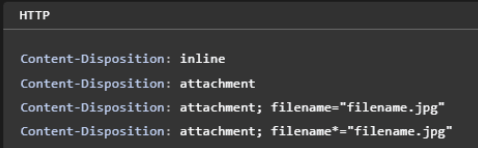
Lets see that working
Live Demo 4
View the Flow
Key component
@{triggerOutputs()[‘queries’]}
@{triggerOutputs()['queries']}
Overview
Sequence
We still have a problem
What do we need?
Reverse Proxy
Solution requirements
Authenticate by Azure B2C
Reverse Proxy function
Where can I find this
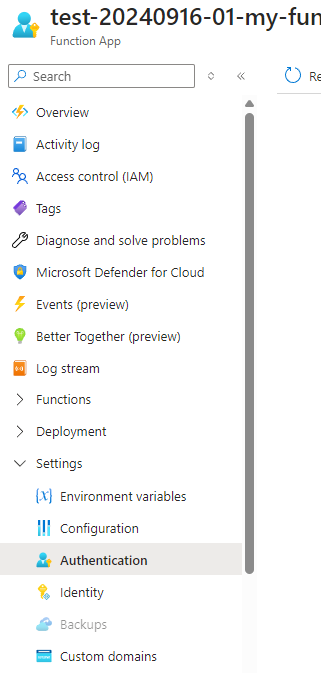
Azure function
- Forwards all headers received from the incoming request.
- Adds custom header Flow-Key (from environment variables).
- Handles GET, POST, OPTIONS method.
- Appends query parameters from the incoming request to the external URL.
FLOW_URL=https://prod-21.uksouth.logic.azure.com/workflows/your-logic-app-url
FLOW_KEY=your-flow-key-value
Lets deploy it
- Access the Repo
- Press Deploy
- Follow the on screen instructions
Lets deploy it
- Access the Repo
- Press Deploy
- Follow the on screen instructions
- Add Environment variables
FLOW_URL=https://prod-15.uksouth.logic.azure.com/workflows/7a854d30969e4158bac2b17ac15d1ad7/triggers/manual/paths/invoke?api-version=2016-06-01&sp=%2Ftriggers%2Fmanual%2Frun&sv=1.0&sig=FrLhWsuldO9AiPgF4ztcjuvjsSrBrJtlD5Mf17jjU_I

FLOW_KEY=ABC123
Lets deploy it
- Access the Repo
- Press Deploy
- Follow the on screen instructions
Lets setup auth
Lets see that working
Demo 5
Try it out
Username:
demo@tweed.technology
Password:
TechTweedie1!
View the flow
Key component
Inbound Header
X-MS-CLIENT-PRINCIPAL-ID
"X-MS-CLIENT-PRINCIPAL-ID": "1ebcd192-5366-48eb-9028-04610ae1704d"
Key component
Fetch XML
<fetch>
  <entity name="techtwed_settlement">
    <attribute name="techtwed_name" />
    <attribute name="techtwed_settlementid" />
    <filter>
      <condition attribute="techtwed_name" operator="eq" value="SET-1001-T8B5" />
    </filter>
    <link-entity name="contact" from="contactid" to="techtwed_customer" alias="contact">
      <link-entity name="adx_externalidentity" from="adx_contactid" to="contactid" alias="externalid">
        <filter>
          <condition attribute="adx_username" operator="eq" value="1ebcd192-5366-48eb-9028-04610ae1704d" />
        </filter>
      </link-entity>
    </link-entity>
  </entity>
</fetch>
High Level Solution
Sequence Diagram
Where have I used this Pattern
- Document Generation
- WiFi Network Login
- Register Interest
- Login to a legacy systems
- Door code generation
- Emails
- Portals
- As a Data Gateway
Questions
Feedback - Presentation - Github Repo
Flow Proxy Architecture Pattern
TOGAF Architectural Pattern Documentation
Version: 1.0
Date: November 26, 2024
Author: Ian Tweedie
Pattern Type: Integration & Security Pattern
Classification: Enterprise Architecture Pattern
Executive Summary
The Flow Proxy Architecture Pattern provides a secure, scalable solution for generating and delivering custom reports through an authenticated web interface. This pattern addresses the challenge of securely exposing Power Platform automated document generation capabilities to end users while maintaining enterprise-grade security controls.
Business Value
- Cost Reduction: Eliminates need for legacy system licenses while maintaining document generation capabilities
- Security Enhancement: Implements authentication and authorization controls for sensitive document access
- User Experience: Provides simple web-based access to generated documents
- Scalability: Leverages cloud-native services for automatic scaling
1. Architecture Vision
1.1 Business Context
Organizations often require secure access to dynamically generated documents based on database content. Traditional approaches involve complex user interfaces or direct system access, which can be costly and pose security risks.
1.2 Architecture Principles
- Separation of Concerns: Clear delineation between presentation, business logic, and data layers
- Security by Design: Authentication and authorization built into the architecture
- Cloud-First: Leverages Azure and Microsoft 365 cloud services
- Minimal Viable Product: Simple implementation with powerful capabilities
- Stateless Design: No server-side session management required
2. Business Architecture
2.1 Business Drivers
- Legacy System Decommissioning: Need to maintain document generation without expensive legacy licenses
- Secure Document Access: Requirement for authenticated access to sensitive documents
- Process Automation: Elimination of manual document generation processes
- Cost Optimization: Reduced operational costs through automation
2.2 Business Capabilities
- Document Generation: Automated creation of PDF documents from templates
- User Authentication: Secure user identification and authorization
- Data Integration: Connection to existing business data sources
- Content Delivery: Web-based document delivery mechanism
2.3 Stakeholders
- End Users: Frontline staff requiring access to generated documents
- Business Analysts: Defining document templates and data requirements
- IT Security: Ensuring compliance with security policies
- System Administrators: Managing and monitoring the solution
3. Information Systems Architecture
3.1 Application Architecture
3.1.1 Application Components
graph TB
    subgraph "Presentation Layer"
        A[Web Browser]
    end

    subgraph "Integration Layer"
        B[Azure Function<br/>Flow Proxy]
        C[Azure B2C Authentication]
    end

    subgraph "Business Logic Layer"
        D[Power Automate Flow]
        E[Word Template Engine]
    end

    subgraph "Data Layer"
        F[Microsoft Dataverse]
        G[SharePoint Templates]
    end

    A --> B
    B --> C
    C --> B
    B --> D
    D --> E
    D --> F
    D --> G
    E --> B
    B --> A
3.1.2 Component Responsibilities
| Component | Responsibility | Technology |
|---|---|---|
| Flow Proxy | Request routing, header management, authentication integration | Azure Function |
| Authentication Service | User identity verification | Azure B2C |
| Document Generator | Template processing, data merging | Power Automate |
| Template Engine | Word document template processing | Office 365 |
| Data Service | Business data retrieval | Microsoft Dataverse |
| Template Repository | Document template storage | SharePoint |
3.2 Data Architecture
3.2.1 Data Flow Diagram
sequenceDiagram
    autonumber
    actor User as End User
    participant Proxy as Flow Proxy
    participant Auth as Azure B2C
    participant Flow as Power Automate
    participant DV as Dataverse
    participant SP as SharePoint

    User->>Proxy: HTTP Request with Parameters
    Proxy->>Auth: Validate Authentication
    Auth-->>Proxy: Authentication Context
    Proxy->>Flow: Forwarded Request + Headers
    Flow->>DV: Query Business Data
    DV-->>Flow: Return Data Records
    Flow->>SP: Retrieve Document Template
    SP-->>Flow: Return Word Template
    Flow->>Flow: Merge Data with Template
    Flow-->>Proxy: Generated PDF Document
    Proxy-->>User: HTTP Response (PDF)
3.2.2 Data Entities
erDiagram
    USER ||--o{ SETTLEMENT : "has access to"
    SETTLEMENT ||--|| DOCUMENT : "generates"
    USER {
        string UserId PK
        string Email
        string DisplayName
        datetime LastLogin
    }
    SETTLEMENT {
        string SettlementId PK
        string Name
        string Status
        datetime CreatedDate
        string CustomerId FK
    }
    DOCUMENT {
        string DocumentId PK
        string SettlementId FK
        string TemplateId
        datetime GeneratedDate
        blob Content
    }
4. Technology Architecture
4.1 Platform Services
4.1.1 Azure Services Stack
graph TB
    subgraph "Microsoft Cloud Platform"
        subgraph "Azure"
            AF[Azure Functions]
            AB2C[Azure B2C]
            ASP[App Service Plan]
            AI[Application Insights]
        end

        subgraph "Power Platform"
            PA[Power Automate]
            DV[Dataverse]
        end

        subgraph "Microsoft 365"
            SP[SharePoint Online]
            WORD[Word Online]
        end
    end

    subgraph "Client"
        WB[Web Browser]
    end

    WB --> AF
    AF --> AB2C
    AF --> PA
    PA --> DV
    PA --> SP
    PA --> WORD
4.1.2 Technology Stack Details
| Layer | Component | Technology | Version | Purpose |
|---|---|---|---|---|
| Client | Web Browser | Any Modern Browser | Current | Document access interface |
| Security | Authentication | Azure B2C | v2.0 | User identity management |
| Integration | Reverse Proxy | Azure Functions | v4.x | Request routing and security |
| Process | Automation Engine | Power Automate | Current | Document generation workflow |
| Template | Document Engine | Word Online | Current | Template processing |
| Data | Database | Microsoft Dataverse | Current | Business data storage |
| Storage | File Storage | SharePoint Online | Current | Template repository |
| Monitoring | Telemetry | Application Insights | Current | Performance monitoring |
4.2 Security Architecture
4.2.1 Security Layers
graph TB
    subgraph "Security Controls"
        subgraph "Authentication Layer"
            B2C[Azure B2C Identity Provider]
            JWT[JWT Token Validation]
        end

        subgraph "Authorization Layer"
            RBAC[Role-Based Access Control]
            RowSec[Row-Level Security]
        end

        subgraph "Transport Layer"
            HTTPS[HTTPS/TLS 1.2+]
            CORS[CORS Policy]
        end

        subgraph "Application Layer"
            KeyMgmt[Key Management]
            HeaderVal[Header Validation]
        end
    end
4.2.2 Security Controls Implementation
| Control Type | Implementation | Technology | Description |
|---|---|---|---|
| Identity | Multi-tenant B2C | Azure B2C | User authentication and profile management |
| Authentication | OpenID Connect | OAuth 2.0/OIDC | Token-based authentication |
| Authorization | Claims-based | FetchXML queries | User-specific data filtering |
| Transport | SSL/TLS | HTTPS | Encrypted communication |
| Application | API Keys | Environment Variables | Service-to-service authentication |
| Data | Row-level filtering | Dataverse Security | User context-based data access |
5. Implementation Roadmap
5.1 Architecture Phases
Phase 1: Core Infrastructure (Weeks 1-2)
- Deploy Azure Function App
- Configure Azure B2C tenant
- Set up basic authentication flow
- Create Dataverse environment
Phase 2: Document Generation (Weeks 3-4)
- Design Word templates
- Implement Power Automate flows
- Configure SharePoint template storage
- Develop document generation logic
Phase 3: Integration & Security (Weeks 5-6)
- Implement Flow Proxy authentication
- Configure row-level security
- Set up monitoring and logging
- User acceptance testing
Phase 4: Production Deployment (Weeks 7-8)
- Production environment setup
- Performance optimization
- Security audit and penetration testing
- Go-live and user training
5.2 Architecture Decision Records (ADRs)
ADR-001: Azure Functions for Reverse Proxy
Decision: Use Azure Functions as the reverse proxy component
Rationale: Native Azure integration, automatic scaling, minimal infrastructure overhead
Alternatives Considered: Azure Application Gateway, NGINX on VM
Status: Approved
ADR-002: Power Automate for Document Generation
Decision: Use Power Automate for business logic and document generation
Rationale: Low-code approach, native Office integration, business user maintainable
Alternatives Considered: Custom .NET application, Logic Apps
Status: Approved
ADR-003: Azure B2C for Authentication
Decision: Implement Azure B2C for user authentication
Rationale: Enterprise-grade identity management, customizable user journeys
Alternatives Considered: Azure AD, custom authentication
Status: Approved
6. Architecture Patterns & Standards
6.1 Design Patterns Applied
6.1.1 Proxy Pattern
classDiagram
    class Client {
        +request()
    }
    class Proxy {
        +authenticate()
        +forward()
        +request()
    }
    class RealService {
        +request()
    }

    Client --> Proxy
    Proxy --> RealService
    Proxy : -realService
Implementation: Azure Function acts as a proxy, handling authentication and forwarding requests to Power Automate flows.
6.1.2 Template Method Pattern
Implementation: Word templates define the document structure, while Power Automate fills in dynamic content.
6.1.3 Gateway Pattern
Implementation: Azure Function serves as an API gateway, providing a single entry point for external requests.
6.2 Integration Patterns
6.2.1 Request-Reply Pattern
- Client sends HTTP request with query parameters
- Proxy validates authentication and forwards request
- Power Automate processes request and returns generated document
- Proxy returns document to client
6.2.2 Content-Based Router Pattern
- Requests routed based on query parameters
- Different document types handled by different flows
- Dynamic routing based on user context
7. Non-Functional Requirements
7.1 Performance Requirements
- Response Time: Document generation < 30 seconds for typical use cases
- Throughput: Support 100 concurrent users
- Scalability: Auto-scale based on demand
7.2 Security Requirements
- Authentication: Multi-factor authentication support
- Authorization: Role-based access control
- Data Protection: Encryption in transit and at rest
- Audit: Complete audit trail of document access
7.3 Availability Requirements
- Uptime: 99.9% availability SLA
- Recovery Time: < 4 hours recovery time objective
- Backup: Daily automated backups
- Disaster Recovery: Cross-region replication
7.4 Compliance Requirements
- Data Residency: Data stored in specified geographic regions
- GDPR: Full compliance with data protection regulations
- Industry Standards: SOC 2 Type II compliance
8. Operations & Governance
8.1 Monitoring & Observability
8.1.1 Key Performance Indicators (KPIs)
- Document generation success rate
- Average response time
- Authentication failure rate
- User adoption metrics
8.1.2 Monitoring Stack
graph LR
    subgraph "Monitoring Tools"
        AI[Application Insights]
        PAM[Power Automate Monitoring]
        AM[Azure Monitor]
        LA[Log Analytics]
    end

    subgraph "Alerting"
        EMAIL[Email Alerts]
        TEAMS[Teams Notifications]
        SMS[SMS Alerts]
    end

    AI --> EMAIL
    PAM --> TEAMS
    AM --> SMS
8.2 Governance Framework
8.2.1 Change Management
- All changes reviewed by Architecture Review Board
- Automated testing required before production deployment
- Rollback procedures documented and tested
8.2.2 Security Governance
- Quarterly security reviews
- Annual penetration testing
- Monthly access reviews
9. Risk Assessment & Mitigation
9.1 Technical Risks
| Risk | Likelihood | Impact | Mitigation Strategy |
|---|---|---|---|
| Service Dependencies | Medium | High | Implement circuit breaker patterns, fallback mechanisms |
| Authentication Failure | Low | High | Multiple authentication providers, manual override procedures |
| Performance Degradation | Medium | Medium | Auto-scaling, performance monitoring, capacity planning |
| Data Breach | Low | High | End-to-end encryption, access controls, audit logging |
9.2 Business Risks
| Risk | Likelihood | Impact | Mitigation Strategy |
|---|---|---|---|
| User Adoption | Medium | Medium | User training, change management, feedback collection |
| Compliance Issues | Low | High | Regular compliance audits, legal review, documentation |
| Cost Overruns | Medium | Low | Cost monitoring, usage alerts, budget controls |
10. Benefits Realization
10.1 Quantified Benefits
10.1.1 Cost Savings
- Legacy License Elimination: $50,000 annually
- Manual Process Reduction: 40 hours/month saved
- Infrastructure Costs: 60% reduction vs. on-premises
10.1.2 Operational Improvements
- Document Generation Time: Reduced from 15 minutes to 30 seconds
- Error Rate: 95% reduction in manual errors
- User Satisfaction: 40% improvement in user experience scores
10.2 Strategic Benefits
- Digital Transformation: Modernized legacy processes
- Security Posture: Enhanced security controls and compliance
- Scalability: Foundation for future automation initiatives
- Innovation Platform: Reusable pattern for other use cases
11. Conclusion
The Flow Proxy Architecture Pattern provides a robust, secure, and scalable solution for authenticated document generation and delivery. By leveraging cloud-native services and modern authentication patterns, this architecture delivers significant business value while maintaining enterprise-grade security and compliance requirements.
Key Success Factors
- Clear separation of concerns between authentication, business logic, and presentation
- Leverage of managed services to reduce operational overhead
- Security-first design with multiple layers of protection
- Scalable architecture that can grow with business needs
- Maintainable solution using low-code/no-code approaches where appropriate
Recommended Next Steps
- Conduct proof-of-concept implementation
- Perform detailed security assessment
- Develop comprehensive testing strategy
- Plan user training and change management
- Establish ongoing monitoring and maintenance procedures
Appendices
A. Technical Configuration Details
A.1 Azure Function Configuration
{
  "FLOW_URL": "https://prod-xx.uksouth.logic.azure.com/workflows/{workflow-id}/triggers/manual/paths/invoke",
  "FLOW_KEY": "your-flow-key-value",
  "CORS_ORIGINS": "*",
  "FUNCTIONS_WORKER_RUNTIME": "node"
}
A.2 Power Automate Flow Configuration
<!-- FetchXML Example -->
<fetch>
  <entity name="settlement">
    <attribute name="name" />
    <attribute name="settlementid" />
    <filter>
      <condition attribute="name" operator="eq" value="@{triggerOutputs()['queries']['row']}" />
    </filter>
    <link-entity name="contact" from="contactid" to="customer">
      <link-entity name="externalidentity" from="contactid" to="contactid">
        <filter>
          <condition attribute="username" operator="eq" value="@{triggerOutputs()['headers']['X-MS-CLIENT-PRINCIPAL-ID']}" />
        </filter>
      </link-entity>
    </link-entity>
  </entity>
</fetch>
B. Deployment Templates
B.1 Azure Resource Manager Template
Available at: GitHub Repository
B.2 Environment Setup Checklist
- Azure subscription with appropriate permissions
- Power Platform environment
- Azure B2C tenant configuration
- SharePoint site for templates
- Dataverse environment setup
Document Control
Version History:
- v1.0 - Initial version (November 26, 2024)
Review Cycle: Annual
Next Review Date: November 26, 2025
Approved By: Enterprise Architecture Review Board